To modernize a mainframe without breaking what depends on it, first find every system that uses the data your COBOL jobs produce. Say a nightly COBOL job writes ACCT_BALANCE to Db2. A Java service, a Snowflake model and a dashboard may all read it, and a rewrite can break each one.
What a mainframe move can break
Whether you refactor in place, wrap a module in an API, rehost or rewrite, the code around ACCT_BALANCE changes, and everything that reads or feeds it has to keep working. Three questions cover it.
- What feeds it on the mainframe? COBOL programs, copybooks (shared record layouts), JCL jobs and Db2 tables pass a field along without a single SQL query, so tools that read query logs can't see those steps.
- What reads it off the mainframe? Java and other application code, pipelines, warehouses such as Snowflake and BI dashboards can all depend on the same field.
- What will a code change affect? Each migration change can rename a field or drop a table that a service or dashboard still uses, and nobody sees it until something fails.
How to map dependencies before you move
These steps work for ACCT_BALANCE and for any other field on your list.
- Pick the fields your business can't afford to break, such as
ACCT_BALANCE.
- Collect the source that actually runs for them: COBOL programs, copybooks, JCL jobs and Db2 definitions.
- Trace each field through the mainframe, from the file or table it starts in to every program that changes it.
- Follow it off the mainframe. List the Java and other application code, pipelines, warehouse models and dashboards that read it.
- Move the pieces with the fewest dependents first, and plan the repointing for the rest.
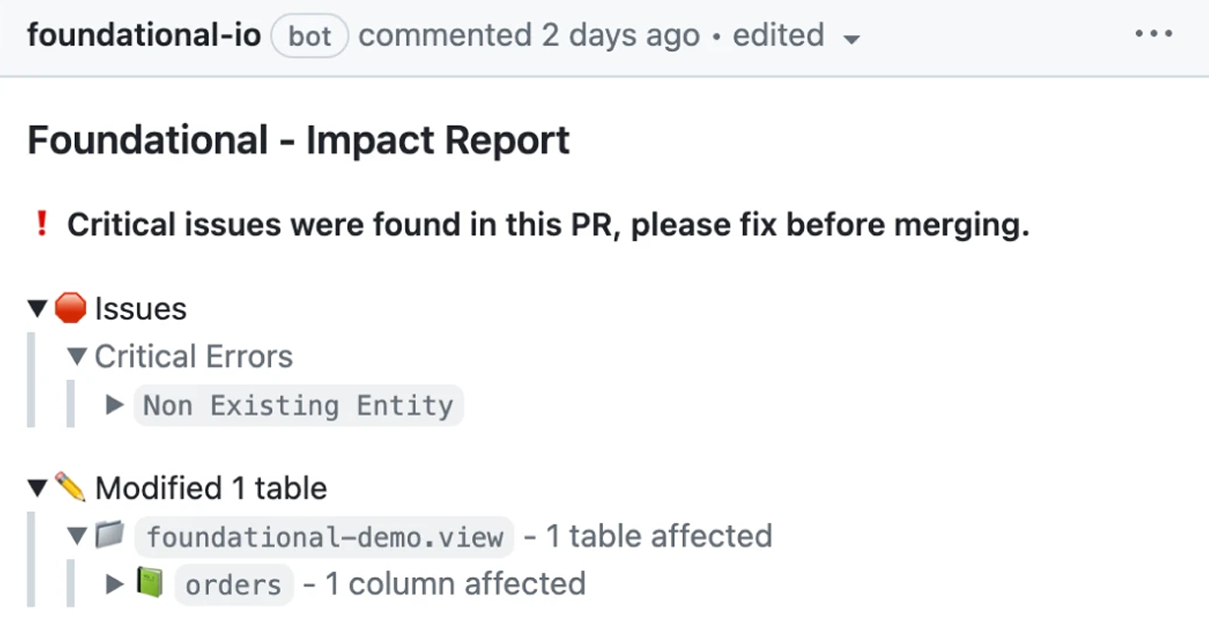
- Check each migration code change against that map, so a renamed field or dropped table is caught before it merges.
- Keep the map current as code changes, so retired jobs and new consumers show up after cutover.
Five tools compared for mainframe modernization
Each tool does a different job on a mainframe move, so compare what it does, what it can see and where it stops.
| Tool |
What it does |
Coverage across your stack |
What it means for your move |
 Foundational |
Static code analysis of COBOL, JCL, copybooks and Db2 |
Mainframe and modern code, pipelines, warehouses and BI |
Checks each migration code change for downstream impact |
 IBM watsonx Code Assistant for Z |
Explains COBOL and JCL with AI, and transforms COBOL to Java |
IBM Z code: COBOL, PL/I, REXX, Assembler and JCL |
Some IMS interfaces are partly or not supported |
 AWS Transform for mainframe |
Assesses code, maps datasets and jobs, refactors COBOL to Java |
z/OS COBOL, PL/I, JCL, Db2 and VSAM files |
Source goes through S3, and data may be processed in another Region |
 Google Mainframe Assessment Tool |
Inventories code and groups it into migratable units |
Mainframe code uploaded as a zip file only |
Assessment only, and migration uses other Google Cloud products |
| IBM Automatic Data Lineage |
Scans JCL jobs and links them to COBOL and SAS programs |
Mainframe batch jobs and datasets only |
JCL utilities such as SORT produce no lineage |
- Foundational: shows what feeds each mainframe field upstream and which programs, services, pipelines, warehouse models and dashboards read it downstream, so you know what to repoint before cutover. It builds that data flow graph by statically analyzing your code in COBOL, JCL, copybooks, Db2, Java and other application code, SQL and more, so it includes code that hasn't run yet. It also checks each migration code change for downstream impact, so a rewrite doesn't break a dashboard or service.
- IBM watsonx Code Assistant for Z: builds an application blueprint with Z Understand, uses generative AI to explain COBOL, PL/I, REXX, Assembler or a JCL step, and can refactor COBOL and transform it to Java.
- AWS Transform for mainframe: maps relationships among datasets, jobs and programs, adds a field-level data dictionary for copybooks and Db2 tables, and refactors COBOL into Java applications.
- Google Mainframe Assessment Tool: maps call dependencies and dataset lineage across jobs, steps and programs, then groups assets into migratable units to plan the move.
- IBM Automatic Data Lineage: reads JCL job definitions, steps and dataset assignments, and links each job to the COBOL or SAS programs it calls.
How to choose
Each kind of tool answers a different question, so you may need more than one.
- What does the code do, and how do I plan the move? An assessment tool inventories the code and groups it into steps.
- Who changes the code? A code assistant or transformation service converts COBOL to Java.
- What reads
ACCT_BALANCE afterwards, on and off the mainframe? Lineage lists the programs, services, pipelines and dashboards to repoint and retest.
If your main worry is a report or service breaking during the move, start with mainframe data lineage from a data & AI governance platform like Foundational, built from static code analysis across COBOL, application code, pipelines, warehouses and BI, then check each migration code change against it.
Frequently asked questions
What tools and platforms can banks and insurers use to modernize their mainframe applications?
There's no single standard stack, so you may need more than one tool. Assessment tools plan the move, code assistants and transformation services change the code, and lineage tools show what depends on the data.
AWS Transform and Google Mainframe Assessment Tool assess a codebase and help plan a cloud move. watsonx Code Assistant for Z explains COBOL and can transform it to Java, while Foundational and IBM Automatic Data Lineage analyze source to show how data moves. Foundational also follows that data into application code, pipelines, warehouses and BI.
How does data lineage help with mainframe modernization and a migration to the cloud?
It shows which programs, jobs, files and tables a change will affect, including the services, pipelines and dashboards off the mainframe that read the same data.
That lets a team sequence a move by dependency, repoint consumers before cutover and confirm that a rewrite still feeds the same downstream callers. Foundational builds that data flow graph by statically analyzing mainframe and application code, and checks each migration code change for downstream impact.
What should I consider before choosing a COBOL modernization platform?
Start with the step you need: assessment, code explanation and transformation, or a data flow graph of what depends on your data.
Then check which languages and artifacts each vendor documents, and whether lineage is field-level or job-and-dataset-level. Also ask whether it reaches past the mainframe into Java and other application code, pipelines, warehouses and BI. Confirm each point in the vendor's current docs, since support varies by product.
Do you need access to the production mainframe or production Db2 to map COBOL, JCL and Db2 dependencies?
Not for every tool. Foundational's source-code path needs read-only access to your source, with no connection to the mainframe or production Db2.
AWS Transform and Google Mainframe Assessment Tool work from source you upload to object storage or as a zip file, so check each vendor's access model before you request credentials.
How should enterprises evaluate automated lineage for mainframe COBOL, JCL and Db2 sources?
Ask what the tool reads and what it does with each field. Check copybook expansion, including REDEFINES overlays, JCL DD binding, and whether the lineage reaches the Java services, pipelines and dashboards that use the data.
Also check that data flow is kept apart from control flow, and that the output names the line of code behind each transformation. Then read what each vendor's docs list as out of scope.
Is a mainframe modernization tool the same as a COBOL data lineage tool?
No. A modernization tool assesses, rehosts, refactors or rewrites COBOL, while a lineage tool shows where a field comes from and what depends on it.
You can use both. AWS Transform and watsonx Code Assistant for Z document transformation paths to Java and change the code, while Foundational shows what each change affects before it merges, across mainframe and modern systems.
code snippet <goes here>
<style>.horizontal-trigger {height: calc(100% - 100vh);}</style>
<script src="https://cdnjs.cloudflare.com/ajax/libs/gsap/3.8.0/gsap.min.js"></script>
<script src="https://cdnjs.cloudflare.com/ajax/libs/gsap/3.8.0/ScrollTrigger.min.js"></script>
<script>
// © Code by T.RICKS, https://www.timothyricks.com/
// Copyright 2021, T.RICKS, All rights reserved.
// You have the license to use this code in your projects but not to redistribute it to others
gsap.registerPlugin(ScrollTrigger);
let horizontalItem = $(".horizontal-item");
let horizontalSection = $(".horizontal-section");
let moveDistance;
function calculateScroll() {
// Desktop
let itemsInView = 3;
let scrollSpeed = 1.2; if (window.matchMedia("(max-width: 479px)").matches) {
// Mobile Portrait
itemsInView = 1;
scrollSpeed = 1.2;
} else if (window.matchMedia("(max-width: 767px)").matches) {
// Mobile Landscape
itemsInView = 1;
scrollSpeed = 1.2;
} else if (window.matchMedia("(max-width: 991px)").matches) {
// Tablet
itemsInView = 2;
scrollSpeed = 1.2;
}
let moveAmount = horizontalItem.length - itemsInView;
let minHeight =
scrollSpeed * horizontalItem.outerWidth() * horizontalItem.length;
if (moveAmount <= 0) {
moveAmount = 0;
minHeight = 0;
// horizontalSection.css('height', '100vh');
} else {
horizontalSection.css("height", "200vh");
}
moveDistance = horizontalItem.outerWidth() * moveAmount;
horizontalSection.css("min-height", minHeight + "px");
}
calculateScroll();
window.onresize = function () {
calculateScroll();
};let tl = gsap.timeline({
scrollTrigger: {
trigger: ".horizontal-trigger",
// trigger element - viewport
start: "top top",
end: "bottom top",
invalidateOnRefresh: true,
scrub: 1
}
});
tl.to(".horizontal-section .list", {
x: () => -moveDistance,
duration: 1
});
</script>