A data flow map shows where personal data is collected, transformed, stored and shared, so engineering can answer a request like "which systems still hold this customer's email?" Privacy platforms, scanners and lineage tools each see a different part of that path, so the right pick depends on which part you can't see today.
What a data flow map covers
A data flow map covers personal data, which under GDPR means anything that can identify a person, from an email to a device ID or an order history tied to an account. That's wider than most PII lists, so a map built only from a PII scan tends to miss fields.
A data inventory tells you where that data sits today. Lineage adds how it got there and where it goes next, which is what you need to answer a deletion request.
What GDPR and CCPA ask for
Five provisions apply to a request like that one. None of them mention data lineage or name a tool.
| Text |
What it asks for |
What a map can support |
| GDPR Article 30 |
Written record of purposes, recipients, transfers, retention and security |
Systems, recipients and fields, while people add purposes and retention |
| GDPR Article 15 |
Confirmation, a copy, and purposes, recipients, storage and source |
Which systems and fields to search |
| GDPR Article 17 |
Erasure without undue delay on listed grounds, with exceptions |
Which systems and columns are in scope |
| CCPA 1798.110 |
Disclose categories, sources, purposes, third parties and specific pieces |
Where personal information is collected and shared |
| CCPA 1798.105 |
Delete collected data and notify service providers and third parties |
Which copies and derived columns to check |
- Article 30 asks for a written record that you can hand to the supervisory authority on request. Organisations under 250 people are exempt unless the processing is risky, isn't occasional, or involves special categories or criminal data.
- The CCPA doesn't require a GDPR-style record of processing, but since 1 January 2026 its regulations require a documented risk assessment before high-risk processing, such as selling or sharing personal information or using sensitive personal information. That assessment lists the personal information involved, why it's used and who receives it. Consumers can also ask to know what you hold and to have it deleted.
How to map personal data flows
These steps work for email, or any other field a request names.
- Start from the personal data you already process, such as
email or account IDs. A discovery scan can add fields you didn't know about.
- Find where each field enters: application code (Python, Java, TypeScript, Go and more), forms, APIs, vendor feeds, operational databases and warehouse tables.
- Trace it through services, ORMs, ETL jobs, dbt models and Spark jobs, at column level where the tool supports it.
- Follow it downstream to BI dashboards, exports, feature tables and models. Foundational shows these hops for the systems you connect.
- Add the Article 30 details a map can't know: purposes, categories of data subjects, recipients, transfers and erasure time limits. People supply these, and a privacy platform is built to hold that register.
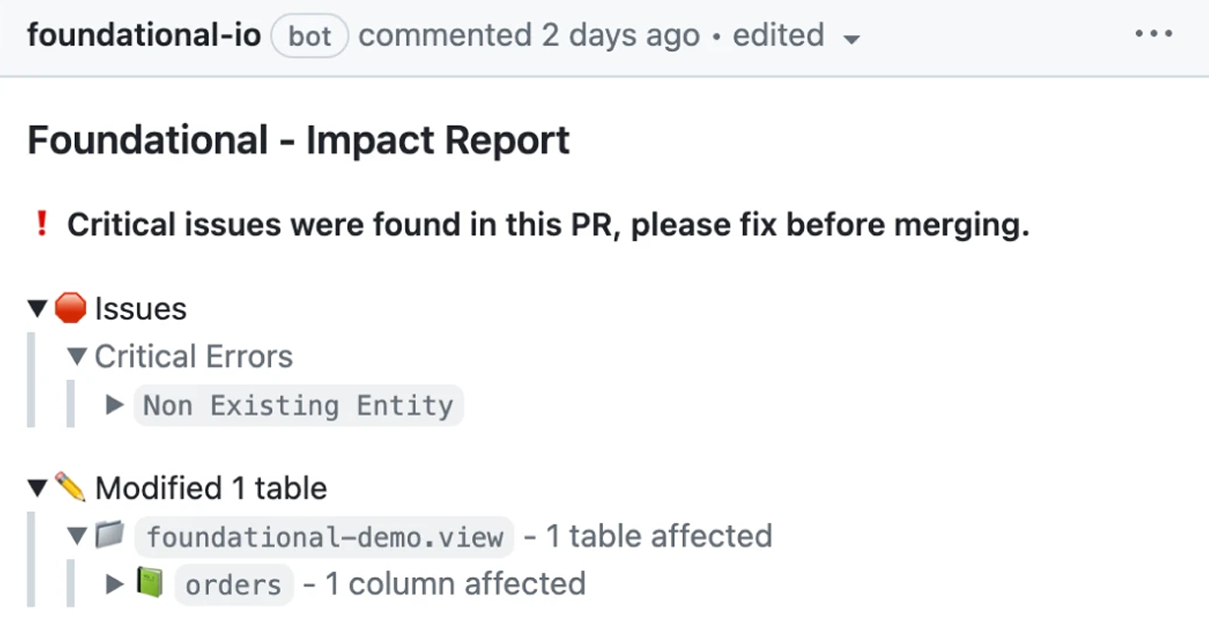
- Re-check the map whenever code changes. Foundational posts downstream impact on the pull request and can block breaking changes before they reach production.
- Use the map to scope each request, not to run it. It lists the systems and columns to search or delete, and your privacy program fulfills the request.
Five data flow mapping tools compared
The laws don't pick a tool, so the difference comes down to how each tool builds the map and which systems it covers.
| Tool |
How it builds the map |
Coverage across your stack |
Where it stops |
 Foundational |
Static code analysis, plus warehouse and BI metadata |
Application code, pipelines, warehouses and BI |
Not a privacy platform, and doesn't classify stored values by default |
 OneTrust |
AI-driven discovery, plus assessments and expert input |
Documented IT assets, processing activities and vendors only |
Lineage tab is a diagram you draw and label |
 TrustArc |
Automated and AI-assisted records, integrations and flow mapping |
Systems and vendors it integrates with only |
Records need review, and complete coverage isn't guaranteed |
 Securiti |
Discovery scans feeding a Sensitive Data Catalog |
Connected data stores and vendors only |
Its page describes scanned data stores, not code paths |
 BigID |
Scan-based discovery and ML classification |
Connected structured and unstructured data stores only |
Its page describes data where it sits, not code paths |
- Foundational: shows where a personal-data column comes from and everything downstream that uses it, across application code, pipelines, warehouses and BI. It builds that data flow graph by statically analyzing your code in Python, Java, TypeScript, Go, COBOL, SQL, Spark and more, so it includes code that hasn't run yet. It also labels columns derived from a PII column as PII, and it doesn't need access to your data.
- OneTrust: gives privacy teams one platform for the data map, Article 30 records, assessments and data subject requests.
- TrustArc: calculates inherent risk across processing activities, recommends follow-up assessments, and produces configurable Article 30 reports.
- Securiti: keeps a Sensitive Data Catalog of assets, processing activities and vendors, and starts PIAs and DPIAs from it.
- BigID: builds a PI/PII inventory by individual, to support GDPR access, erasure and portability requests.
Privacy code scanners are a separate category. They trace sensitive data from application source code to sinks such as logs, databases and third-party APIs, and they can run in CI. Each fully analyzes only a limited set of languages, per its docs.
How to choose
Five checks help you pick a tool for the email question.
- Trace three real fields from your record of processing or a recent request, and ask each vendor to show every system and column they pass through.
- Match tools to where your logic lives (application services, ORMs, dbt, Spark, warehouse SQL and ETL tools), and ask for the supported-source list.
- Decide who holds the legal record of purposes, recipients, transfers and retention, and ask how the map feeds that register.
- Ask how the map stays fresh: on code changes, job runs, scans or manual edits.
- Check what access the tool needs. With Foundational, teams with access constraints can start with code access only.
You can pair a privacy platform for the register and requests with a discovery scanner for stored data and code-level data lineage tools for the paths in source. The layers overlap, but none replaces the others.
Frequently asked questions
How do you map personal data flows for GDPR?
List the personal data you process, find where each field enters, and trace it through application code, pipelines, storage and downstream tools.
Then add what Article 30 asks for: purposes, categories of data subjects and personal data, recipients, transfers and erasure time limits where possible. A data flow graph or code scan gives you the technical path, and a privacy platform holds the record.
What are the best data flow mapping tools for privacy compliance?
There's no single best tool, because each kind covers a different part of the problem. Privacy platforms such as OneTrust, TrustArc and Securiti hold processing inventories and can generate Article 30 reports.
Discovery products such as BigID scan connected stores to inventory personal data. Foundational, a data & AI governance platform, statically analyzes your code to build column-level lineage and shows what a code change would affect before it merges. You can pair any of them.
What tool tracks where PII flows across applications and the data warehouse?
A code-based lineage tool can follow a PII column from application code (Python, Java, TypeScript, Go, COBOL and more) and pipelines into the warehouse and, when connected, into BI. Foundational does this at column level.
A discovery scanner inventories personal data where it sits in connected stores, and a privacy code scanner traces sensitive data in source code to sinks such as logs and APIs. Pick the tool that covers the part of the path you can't see yet.
Can you automate a GDPR record of processing activities from code?
You can automate the technical inputs, but not the legal record. Code scanners and lineage tools show where personal data is collected, transformed, stored and sent.
Some privacy code scanners suggest RoPA edits for a privacy team to review, and privacy platforms generate Article 30 reports from an inventory. Article 30 still requires a written record with purposes, recipients and transfers, available to the authority on request.
How does data lineage help with GDPR?
Data lineage shows the path a personal-data column takes through connected code, warehouses and BI tools.
That path can support an Article 30 record, an Article 15 access request or an Article 17 erasure request by identifying the systems and fields involved. It doesn't replace the record or fulfill the request, and none of those three articles mention data lineage or name a tool.
What CCPA data inventory and data mapping tool should engineering teams use?
Use a discovery tool to inventory stored personal information, and a lineage or code-scanning tool to show how those fields move through code and pipelines.
A privacy platform can run the request workflow. The CCPA doesn't require a GDPR-style record, but since 2026 it requires documented risk assessments for high-risk processing, and consumers can ask to know and delete their personal information. Engineers need a map of where it's collected, stored and shared.
code snippet <goes here>
<style>.horizontal-trigger {height: calc(100% - 100vh);}</style>
<script src="https://cdnjs.cloudflare.com/ajax/libs/gsap/3.8.0/gsap.min.js"></script>
<script src="https://cdnjs.cloudflare.com/ajax/libs/gsap/3.8.0/ScrollTrigger.min.js"></script>
<script>
// © Code by T.RICKS, https://www.timothyricks.com/
// Copyright 2021, T.RICKS, All rights reserved.
// You have the license to use this code in your projects but not to redistribute it to others
gsap.registerPlugin(ScrollTrigger);
let horizontalItem = $(".horizontal-item");
let horizontalSection = $(".horizontal-section");
let moveDistance;
function calculateScroll() {
// Desktop
let itemsInView = 3;
let scrollSpeed = 1.2; if (window.matchMedia("(max-width: 479px)").matches) {
// Mobile Portrait
itemsInView = 1;
scrollSpeed = 1.2;
} else if (window.matchMedia("(max-width: 767px)").matches) {
// Mobile Landscape
itemsInView = 1;
scrollSpeed = 1.2;
} else if (window.matchMedia("(max-width: 991px)").matches) {
// Tablet
itemsInView = 2;
scrollSpeed = 1.2;
}
let moveAmount = horizontalItem.length - itemsInView;
let minHeight =
scrollSpeed * horizontalItem.outerWidth() * horizontalItem.length;
if (moveAmount <= 0) {
moveAmount = 0;
minHeight = 0;
// horizontalSection.css('height', '100vh');
} else {
horizontalSection.css("height", "200vh");
}
moveDistance = horizontalItem.outerWidth() * moveAmount;
horizontalSection.css("min-height", minHeight + "px");
}
calculateScroll();
window.onresize = function () {
calculateScroll();
};let tl = gsap.timeline({
scrollTrigger: {
trigger: ".horizontal-trigger",
// trigger element - viewport
start: "top top",
end: "bottom top",
invalidateOnRefresh: true,
scrub: 1
}
});
tl.to(".horizontal-section .list", {
x: () => -moveDistance,
duration: 1
});
</script>