Table of Content

Subscribe to our Newsletter
Get the latest from our team delivered to your inbox
Thank you! Your submission has been received!
Oops! Something went wrong while submitting the form.
Ready to get started?
Try It Free

Column-level lineage for Snowflake shows which code feeds each column and which models and dashboards read it, so you can change a column without guessing what breaks. Snowflake's built-in lineage, Foundational, Atlan, Collibra and DataHub all provide it, and they differ in where the lineage comes from and how far past Snowflake it reaches.
Say the checkout team changes how a Java service calculates order_total, so it now excludes tax. The service writes the value to Postgres, Fivetran loads it into RAW.ORDERS in Snowflake, and two dbt models, stg_orders and fct_revenue, turn it into net_revenue. A Power BI revenue dashboard reads fct_revenue. Nothing fails, but the revenue numbers drop overnight and nobody on the data team knows why.
To answer that, the lineage has to cover four kinds of systems:
Lineage that covers only the Snowflake part will show RAW.ORDERS.order_total flowing into net_revenue. It won't show the calculation in the service that changed the value, or the dashboard that now shows the wrong number.
All five give you column lineage for Snowflake, but they get it from different places.
| Tool | Where the lineage comes from | What it covers | When you see it |
|---|---|---|---|
| Foundational | Static analysis of your code, plus Snowflake query history and metadata | Application code, pipelines, Snowflake and BI, pushed to your catalog | Before merge, on the pull request |
| Snowflake lineage | Statements that moved data, plus object dependencies | Snowflake objects, plus tools that send OpenLineage events | After the statement runs, in Snowsight |
| Atlan | Mined Snowflake query and access history | Snowflake plus other tools connected to Atlan | After the queries run and are mined |
| Collibra | Schemas, views and stored procedures, or executed queries | Snowflake plus other sources Collibra harvests | After each lineage harvest |
| DataHub | View definitions, dynamic tables and query history | Snowflake plus other sources ingested into DataHub | After each ingestion run |
Foundational is a data & AI governance platform. It statically analyzes code to build the data flow graph, at the column level. The data flow graph covers the code that writes to Snowflake, the SQL, stored procedures and Snowpark code inside it, and the tools that read from it. It reads Python, Java, TypeScript, Go, Scala, SQL, dbt, Spark, COBOL and more, and combines that code with Snowflake query history and metadata, so dynamic tables, streams and tasks sit in the same data flow graph as your code.
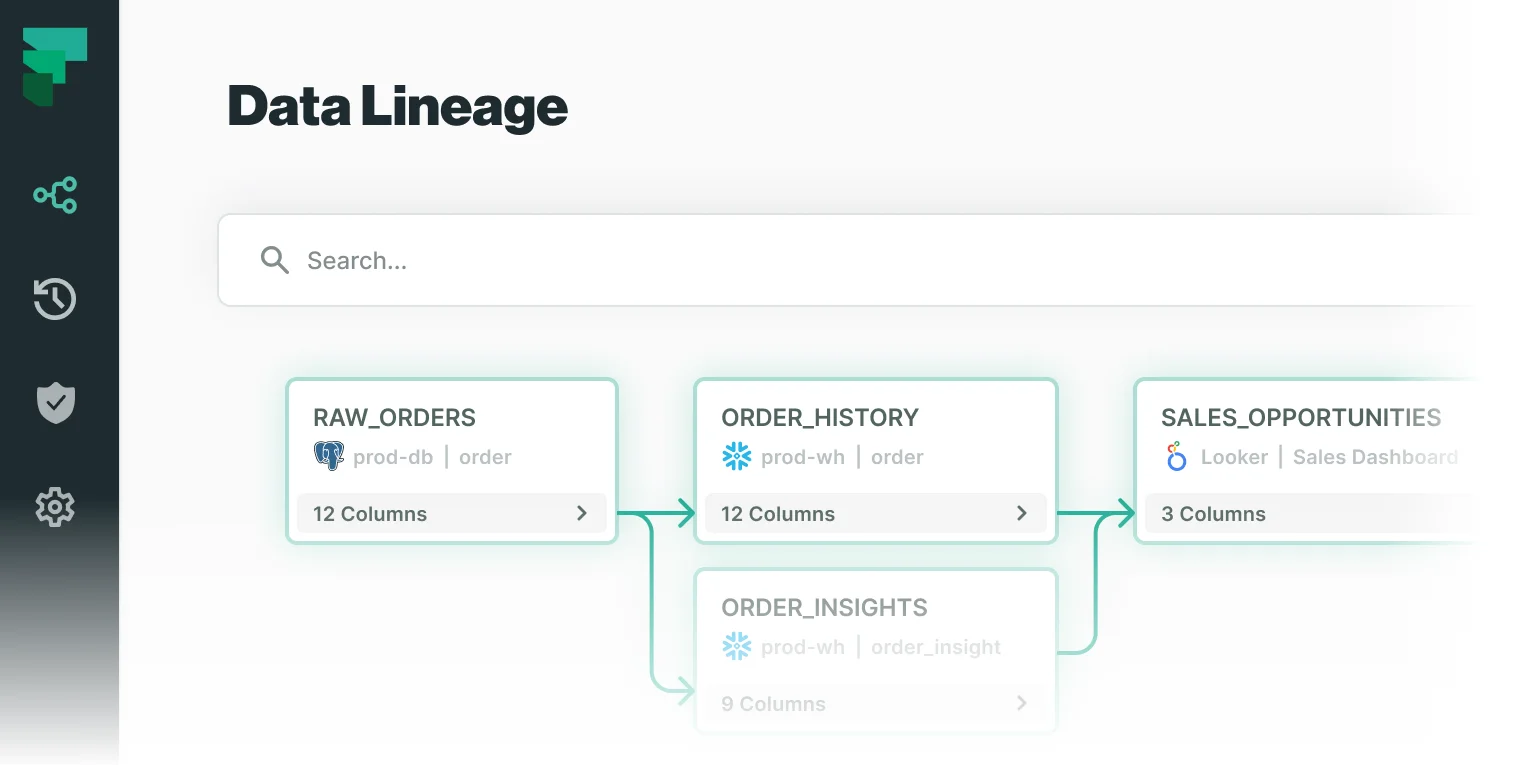
Because the lineage comes from code, it includes tables and columns that haven't been queried yet. In the order_total example from the start of this page, Foundational follows the value through the Java service's business logic, from the calculation that changed to the column the service writes, then through the dbt models to the Power BI dashboard. On every pull request, it shows which downstream tables and dashboards the change affects, as a comment in your source control, such as GitHub, GitLab, Bitbucket or Azure DevOps. It doesn't access your data.
Foundational also pushes its lineage into Snowflake, Atlan, Collibra and DataHub, so your team sees the code-level view in the catalog it already uses. Its column-level data lineage covers Airflow, Kafka, Flink, Power BI, Tableau, Looker and more. It's also available on the Snowflake Marketplace.
Fits when the changes that affect your Snowflake columns start in application code or pipelines, and you want to see the impact before merge and in the catalog you already use.
Snowflake's built-in data lineage is part of Enterprise Edition and higher. On the Lineage tab in Snowsight, you can pick a column and list every upstream and downstream column that shares its lineage, along with each column's distance. Snowflake records data movement, such as CREATE TABLE AS SELECT, INSERT and MERGE, and object dependencies, such as a view on a table. Column lineage is kept for one year.
Lineage covers Snowflake objects by default. Through external lineage, tools such as dbt and Airflow can send OpenLineage events to a Snowflake endpoint, and those external objects then appear in the same Snowflake lineage graph, including column-level edges. Snowflake documents a few gaps, such as tables used only to filter or join, and data moved through separate, disconnected queries.
Fits when most of your transformations run inside Snowflake and you want lineage without adding another tool.
Atlan builds column-level lineage for Snowflake automatically from query history. Its miner reads QUERY_HISTORY and ACCESS_HISTORY and derives lineage from the queries your users and pipelines actually ran. Later runs keep it current. By default, the miner looks back two weeks. To go further back, you can use S3-based mining or contact Atlan support. Snowflake lineage then joins the other tools in your Atlan catalog, such as dbt models upstream and Power BI downstream.
Fits when Atlan is already your catalog and the transformations you care about run regularly in Snowflake.
Collibra offers two ways to build Snowflake technical lineage. SQL mode analyzes your schemas, views and stored procedures directly, so it includes transformations that haven't run recently. SQL-API mode builds lineage from the queries that actually ran during the selected period, using Snowflake's ACCESS_HISTORY, which also captures application and ad hoc queries. You can also upload SQL files from shared or cloud storage. Collibra harvests technical lineage from ETL and BI tools too, such as Tableau and Power BI.
Fits when Collibra is your governance platform and you want Snowflake lineage inside the same catalog and stewardship workflows.
DataHub's Snowflake connector extracts table- and column-level lineage from view definitions, dynamic table definitions and SQL query history. Column lineage is on by default. DataHub has separate connectors for dbt, Airflow and Power BI, so lineage from those tools can join the Snowflake lineage in one catalog.
Fits when you run DataHub as your catalog and want open-source, connector-based lineage across the tools you ingest.
Start with where the changes to your Snowflake columns come from, then check which tool covers that system.
If dbt does most of your Snowflake transformations, this post on Snowflake and dbt lineage shows where dbt's own lineage stops.
Bring one Snowflake column and we'll trace it from the code that writes it to the dashboards that read it.
Bring one Snowflake column and we'll trace it from the code that writes it to the dashboards that read it.
Bring one Snowflake column and we'll trace it from the code that writes it to the dashboards that read it.